Last night Google Maps 2.0 was released for iOS, which bring an improved mapping experience plus also an iPad version. We previously told you about the undocumented trick on how to cache maps for offline use, which is handy for travellers or people without data plans. But once you’ve cached a large map, how do you clear the cache to save space on your iPhone, for all you megabyte watchers out there?
It’s simple, but in order to do so it takes a few steps to navigate through the app’s settings. Just follow the steps below:
Settings > About, terms & privacy > Terms & privacy > Clear application data
A pop-up message will prompt you to agree to “clear all local application data, including cache data, and reset cookies.” If you untick the box below, it will also allow you to sign out of Google Maps as well:
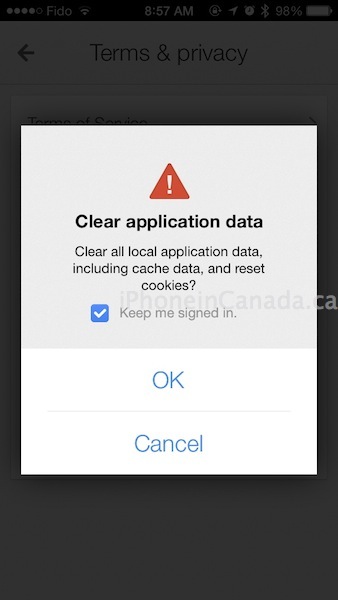
Trying to clear the application’s data and signing out may seem complex and somewhat hidden, but then again it’s in Google’s best interest to keep on collecting your data. Let us know how you’re liking Google Maps 2.0 for iOS so far.
Thanks bauub




still can’t access local address book to select from/to destination. 🙁
Hopefully that will come in the next update. Maybe Google wants us to sync our contacts with them first…
I love the new Google Maps, it is still much, much better than the native app. I think there is more room for improvement to make accessing older addresses easier and contacts, but so far it is the best one out there in my opinion.
It would be cool to get new voice options, I want Yoda “mmmmm Here you are at” for example 🙂
Great with this way. Moreover, here is another way to clear iPhone cache files, cookies and more. View my Profile for the way or search for YouTube channel “iPhone Manager”.
yah reset cache worked 🙂