Air Canada has quietly added Passbook support for boarding passes. Passbook is Apple’s new ticket repository that debuted with iOS 6. Essentially it stores all your coupons, gift cards, passes, movie tickets and anything else that has a barcode.
According to iPhoneinCanada reader @aaron604, existing customers that purchase airline tickets are sent unique URLs via text message. Upon visiting these URLs, you’re directed to a page where a Passbook version of your boarding pass appears on the screen with the option to ‘add’ it. Once added, the ticket sits within Passbook and is ready to be used. Aaron did note he did not get a boarding pass notification when he got to the airport.
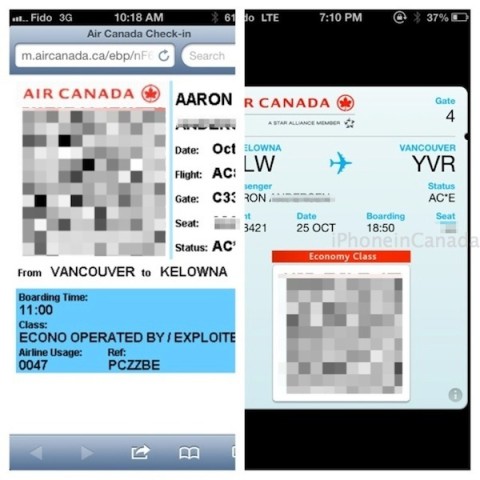
We tested the unique URL Aaron was sent from Air Canada and we were able to add the ticket into Passbook ourselves. Below on the left is what Air Canada users can use as part of a web check-in for boarding passes–compare that to the lovely Passbook image on the right:
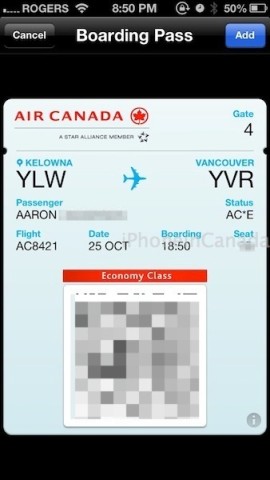
After tapping the URL Air Canada texts you, the screen below will appear–your Boarding Pass with the option to ‘Add’ to Passbook:

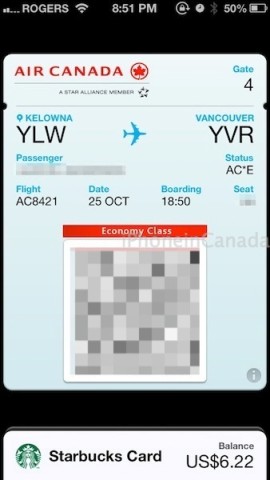
Here’s how the Air Canada board pass looks within Passbook (you can see my Starbucks Card at the bottom too). If you click on the ‘more info’ icon, it reveals your booking reference number and e-ticket number.
Porter Airlines was the first airline in Canada to integrate Passbook. You can bet other airlines are busy integrating Passbook as well.
We haven’t heard of any official Air Canada announcements on this yet. If anyone out there is flying Air Canada soon, let us know if you were able to integrate your boarding pass into Passbook.
Update: Air Canada responded to us and noted the following regarding Passbook support:
Customers who check-in on mobile.aircanada.com, aircanada.com or at and airport kiosk and access their Electronic Boarding Pass with a supported device (iPhone or iPod touch on iOS 6) will receive the Passbook version of the Electronic Boarding Pass. The Passbook version works just like our existing Electronic Boarding Pass and will allow customers to identify themselves at airport kiosks, check-in counters, enable them to pass through security and board their flights.
Air Canada is among the first airlines to support Passbook. Air Canada’s integration with Passbook will further simplify the customer’s travel experience and maintain Air Canada’s position as a top innovator in the Airline industry.
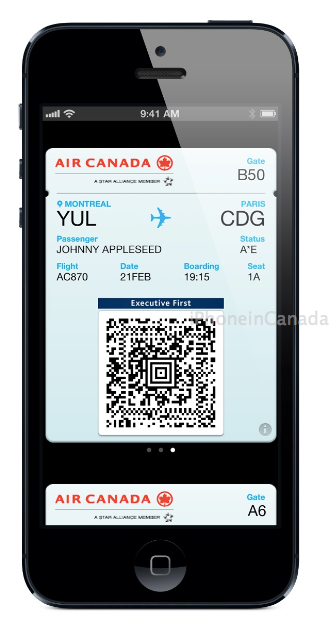
Air Canada noted they have submitted a new version of their app to the App Store for approval to allow for boarding passes to be downloaded from within right to Passbook. Another update is coming to in a few weeks to add Lock screen support (which we noted was absent) based on relevant time settings, with further Passbook enhancements coming in 2013. Below is an official image of Air Canada and Passbook:




I think the biggest question is. When will Tim Hortons be added to Passbook!
True!
That will be the day that Passbook takes off (in Canada). I know the Starbucks integration has been very good so far.
How did @aaron604 get a text message for his purchase? Is this a service he or she signed up for? I bought tickets for San Francisco this week on Air Canada’s web site and I have not received any such text messages. I just checked on the site “My Bookings” section and while my flight booking information appears, there doesn’t seem to be any way to get a Passbook compatible boarding pass.
Air Canada responded and gave us more info.
Have you checked out Air Canada’s Electronic Boarding Pass page? Looks like USA travel is still not yet eligible for Electronic Boarding Pass / Passbook http://www.aircanada.com/en/travelinfo/traveller/mobile/ebp.html
Same doesn’t seem to work, even on the AC app it claims that there is passbook selection button after I check in but it is not there 🙁
Worked for me yesterday. Once you check in it will ask you if you want to add to passbook.
Sweet!
Were you able to enable it for the lock screen?
Post updated with info from Air Canada on how to get Passbook. Refresh!
Nice!
Question for you guys… what happens if you travel with the family? and you manage the check-in/boarding passes of the whole crew?.. can Passbook manage different passengers in the same device other than just yourself?
Thanks!
I would think all the tickets would appear in Passbook, individually.