How To…

How to Jailbreak your iPhone 3G (2.0.1) with WinPwn 2.0.0.4
Good morning everyone! Great news today for all you iPhone 3G owners out there who have been contemplating a jailbreak. Yours truly went ahead with it on the weekend and after my first attempt I was successful! I know I had talked about not jailbreaking my 3G in the past, but after some nagging from...
How to Update iPhone Firmware 1.1.4 to 2.0.1 via WinPwn (VIDEO)!
*edit* Just to let everyone know, this tutorial has been outdated and needs updating. If you want to update your first gen iPhone to 2.x.x firmware, this is what you need to do: 1. Sync your iPhone. Update in iTunes to 2.2.1 firmware. You can use the latest version of iTunes. 2. Download QuickPwn (either...
How to Erase and Reset your iPhone 3G
Given how I've had some issues lately with my iPhone 3G battery, part of the Rogers exchange involves sending back my old iPhone to them. Obviously before you do so, it is imperative that you erase and reset your iPhone to its original state--unless you want someone looking through all your emails, texts, and pictures!...

How to Follow the Olympics on your iPhone 3G
Everybody right now has caught some sort of Olympic fever by now. If it wasn't the dazzling opening ceremonies that got you, the incredible displays of sheer strength and agility in the gymnastics will get ya. If you have the 6GB data plan on your iPhone 3G then you have no excuse to stay connected...

How to: invisibleSHIELD iPhone 3G Install Video Tutorial Part 2
Okay guys and gals, here's the second part of my invisibleSHIELD iPhone 3G install video tutorial. I posted Part 1 of the front piece install yesterday. It took a while to upload to YouTube so I let it go overnight. I didn't have enough time to film me pressing down the corners, but I do...
How to: invisibleSHIELD iPhone 3G Install Tutorial VIDEO!
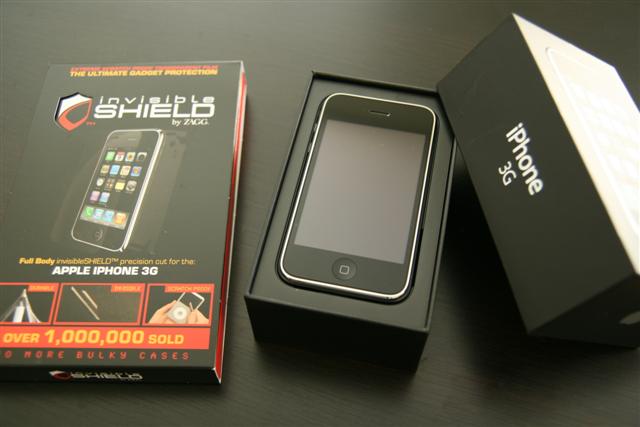
One of the best ways to protect your precious iPhone 3G is with a case, either silicone, plastic, or leather. My current solution is the invisibleSHIELD by ZAGG and just yesterday I installed it on my 2nd replacement unit I received from Rogers (which, funny enough the UPS guy decided to let my neighbour sign...

iPhone 3G Firmware 2.0.1 Update Released: Works GREAT!
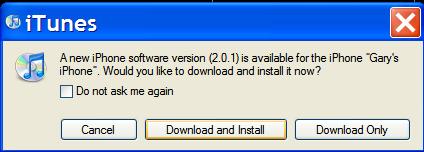
FINALLY! Apple has a released their first update for firmware 2.0 today. I've been waiting for this for a long time. Ever since I've had my iPhone 3G it's been very slow, sluggish, and would reboot by itself automatically at randome times (FAIL!). The firmware version 2.0.1 update is roughly a 250MB download and will...
Visual Voicemail Explained on iPhone 3G
Hey all! Today's discussion will be about Visual VoiceMail with the iPhone 3G. Visual Voicemail What is Visual Voicemail? Visual Voicemail is being able to see and access your voicemails in whichever order you want. It provides you with the option to see and directly go to any of your messages without having to listen...

How to Speed Up iPhone 3G Syncing in iTunes
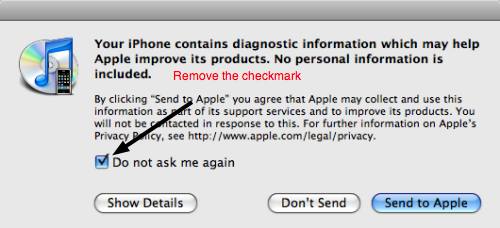
Many people have had this issue with syncing their iPhone 3G's--long sync times. What gives? Well it turns out the delay has been linked to the iPhone's sending of diagnostic data back to Apple. The following procedure does not remove the backup process itself, so your precious iPhone data will still be there. I just...

ZAGG invisibleSHIELD iPhone 3G Review: How to Install & CONTEST!!!
The invisibleSHIELD has a long standing reputation as one of the premier screenprotectors for electronics out there. When I managed to get my hands on a sample for my first gen iPhone, I wasn't sure what to think. I had heard about them before but never really tried them out. After seeing the positive results...
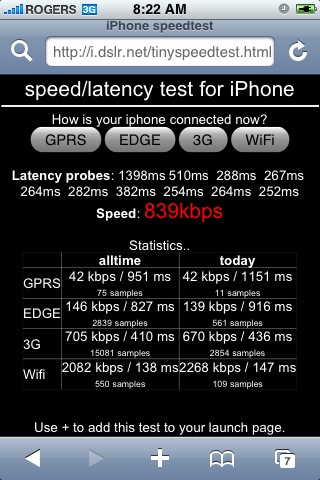
How to: iPhone Speedtest – 3G vs EDGE vs WiFi
When I first tasted the speeds of 3G wireless data my mouth salivated like Pavlov's dog. After playing around with an iPhone 3G test unit at the Rogers dealer inside Tillicum Mall in Victoria, I was impressed with how quickly Safari was loading web pages. Waiting at red lights in the car has become even...

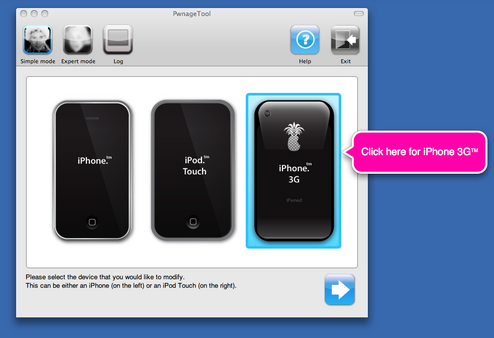
Pwnage Tool Released – FAQ: What You Need to Know
Eureka! In about a week's time the latest iPhone firmware 2.0 has been cracked and the Pwnage tool was released yesterday by the iPhone Dev Team. This is great news to people who are using first generation iPhones, iPod Touches, and the iPhone 3G. For all the people who aren't hardcore iPhone users and have...