
Microsoft 365 Support to End on Older Macs and iPhones Starting in July
Microsoft is ending core support of Microsoft 365, Office 2019, and Office 2021 on older Macs and iPhones, starting July 13th.
Before the presentation of the whole new design of the iOS 7 user interface, rumours had already hinted at a flat design with more white spece. Still, when iOS 7 was unveiled, it surprised most of us. And Gruber was right again: it is polarizing. After six years of a skeuomorphic user interface, the lightness of iOS 7 comes as a big change. And after using it for almost a week, I have to admit it is a delightful change.
But then again, Apple is right: you have to use it to experience the beauty of the new design.
After you get over the initial shock, the new features are there to keep you engaged. In this article, I will talk about the first obvious changes that have become essential in my interaction with the iPhone.
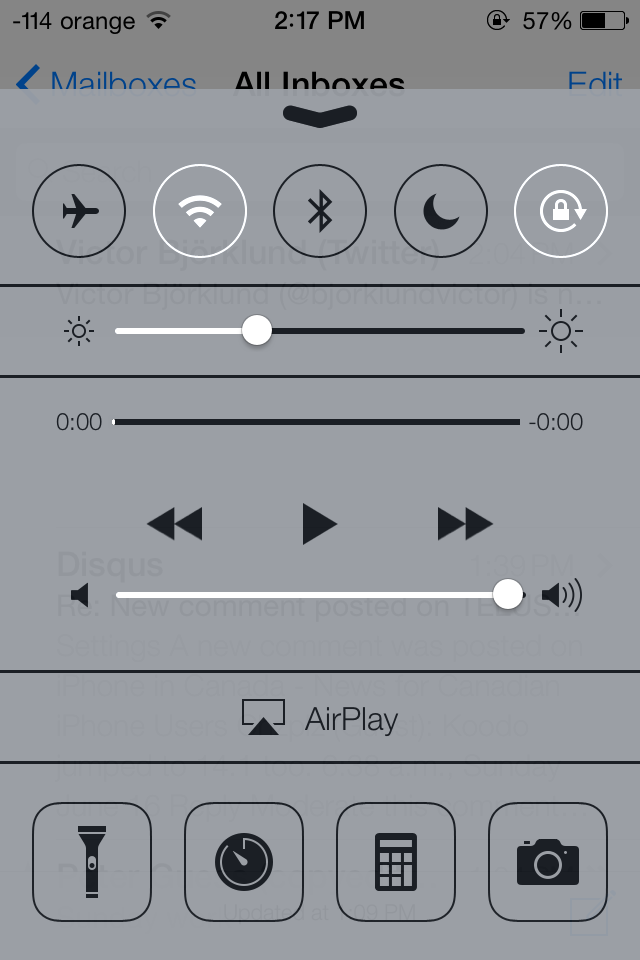
First things first – the Control Center. That is simply something you can’t miss, as it is a most welcome enhancement built into iOS 7, because some things should be only a swipe away. Some of us have waited for Evasi0n just to install SBSettings or Auxo — among others, of course — to have quick access to essential controls on iOS 6. Now, Control Center replaces that need.
And that includes multitasking as well: Apple has re-imagined multitasking, and I have to admit that I love it. And it is more fluid, more natural, and more gesture-based compared to the dated multitasking iOS 6 has.
Overall, iOS 7 feels much lighter due to its new design and what I can’t emphasize enough, it has become more colourful, which enhances the user overall user experience. I can’t say though I love all the icons, because I would be exaggerating, but as The Next Web has already pointed out: it is a work in progress.
Want to know more about the new exciting features iOS 7 comes with this fall? Stay tuned, we’ll keep you posted as we dig into Apple’s latest mobile OS.
Want to see more of our stories on Google?

P.S. Want to keep this site truly independent? Support us by buying us a beer, treating us to a coffee, or shopping through Amazon here. Links in this post are affiliate links, so we earn a tiny commission at no charge to you. Thanks for supporting independent Canadian media!


I think the big thing Control Center is missing at the moment is the ability to turn on/off cellular data. This is a big miss for me.
Why would you ever turn off cellular data? Get a flip phone if you want that..
Maybe because you want to save battery life?
If you’re traveling and preserving roaming data for when you really need it.
Agreed
In my opinion is the ability to activate personal hotspot
Yea and see for me it would be a toggle for tethering. So I think there is your issue, we all have one of those toggles we’d like to get at that may not be universal, so they made some choices that are good for everyone. However, what would be extremely neat would be if you can swap out some of those toggles at the top for others that you prefer. For example I might switch the airplane-mode toggle for my preferred tethering-switch. That would be a welcome feature if they decide to include it 🙂
reason the tether toggle isnt in (which i agree, would be amazing) is because tethering is carrier specific, unfortunately…
Perhaps, but the number of iOS devices in use around the world having a settings page dedicated to it would prove immensely useful.
right but like i said, if its not available with a carrier, the option doesnt show up at all
if you were apple would you want to even go there?
i love that there’s a flashlight and calculator in control centre.
They have QR for messages in 10.9… why cant they do it with ios 7. The only feature I want in ios 7 is quick reply…
It could be in the final release, don’t draw to conclusions yet. =)
Its true, but it wasn’t part of the features “they didn’t get to”. My hopes aren’t high it will be in GM.
Don’t think it will happen, but it would be nice if control center gave you the option of picking which shortcuts you wanted to put in there.
Welcome to android 5 years ago
I find it funny that you bring up that on an iPhone website. Go away troll.
Every site has its trolls. The best way to deal with them is not to engage them. Commenting “around” them usually works. 🙂
Blame flipboard. I keep up with all technology news because I want the best. I’m not opposed to owning apple but won’t until they are the best
World clock now shows the time different
Excellent quick overview btw. Keep ’em coming 😉
Thanks. Istvan has more goodies coming our way!
I wish we could be able to choose what we want in the control center. In a future update maybe 😉
lol thats a good one apple letting customers choose their interface. no apple says this is what you get. and you love it
One simple feature I have been hoping for is distribution lists in mail. I still cannot believe it is not built in. Seems so simple. Any sign of it in mail?
i wish they will put quick access to turn on Location!
Mine is off most of the time to conserve battery and only turn it on when needed for map etc.