
WhatsApp Makes Searching Old Messages Easier on iPhone
WhatsApp is officially releasing an in-chat search button on iOS, removing the need to navigate to a sepeate menu.
Apple Pay launched last fall in Canada for American Express cardholders only, which meant the majority of Visa and MasterCard users with cards from Canadian banks were left out in the cold. But that changed yesterday with expansion to Visa, MasterCard and Interac from RBC and CIBC, with TD, Scotiabank and BMO coming next month.
Update: TD, Scotiabank and BMO Apple Pay support now LIVE!
Here’s a quick primer on what you need to know about Apple Pay in Canada, now that ‘ish’ has just got real.
What is Apple Pay?
Apple Pay allows you to add your credit or debit card to your iPhone or Apple Watch, so you can tap to pay with your smartphone at any supported Near Field Communication (NFC) terminal, but securely with Touch ID, without needing to have your physical cards on you.
What banks support Apple Pay?
Coming soon:
Banks and cards that have responded with non-answers:
What took so long for Canadian banks to support Apple Pay?
Apple says one reason for the delay was due to the integration of Interac, so debit cards could be supported too.
Does it cost Canadian banks anything to use Apple Pay?
Yes. Interchange fees are rumoured to be at 15 cents per every $100 spent using credit cards on Apple Pay and 4 cents per every $100 with debit cards.
Where does Apple Pay work?
Any store that supports contactless payments for Visa, MasterCard and American Express will accept Apple Pay. Just look for these symbols at checkout:

What Device do I need to use Apple Pay?
How do I setup Apple Pay on my iPhone?
1. Launch the Wallet app on your iPhone 6, iPhone 6 Plus or iPhone SE. Tap the “+” icon in the top right corner and follow the prompts.

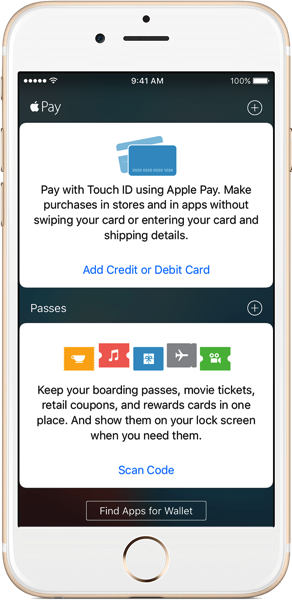
2. Your bank will ask for verification, either by phone, text or email. You can go to Settings > Wallet & Apple Pay, select your card, then enter in verification information. You can now use Apple Pay.
RBC customers need the RBC Wallet iOS app to authenticate, but don’t need it to actually make Apple Pay purchases, despite the bank’s marketing instructions.
How do I setup Apple Pay on my iPad?
1. Add your card by going to: Settings > Wallet & Apple Pay. Tap ‘Add Credit or Debit Card’. Follow the prompts.
2. Your bank may ask to verify your info. Go back to Settings > Wallet & Apple Pay, tap your card and enter it. You can now use Apple Pay.
How do I setup Apple Pay on my Apple Watch?
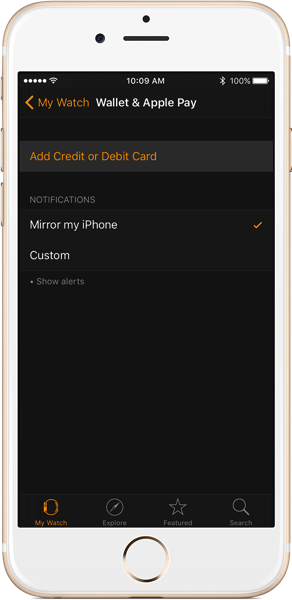
1. Your watch needs to be paired to an iPhone 5 or newer running the latest version of watchOS. Launch the Watch app on your iPhone, tap the ‘My Watch’ tab along the bottom, then go to Wallet & Apple Pay.
2. Tap ‘Add Credit or Debit Card’ and follow the prompts; your bank may ask you to verify your card information. Once this is done, you can now use Apple Pay.
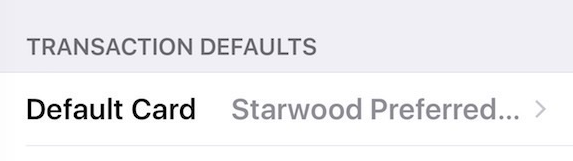
What will be my default card on Apple Pay?
How do I pay with Apple Pay using my iPhone?
1. At checkout, when the cashier asks what payment method you’re using, DO NOT SAY APPLE PAY at this time, as we’re so early it confuses employees. Just say you’re paying with credit card.
2. Once the terminal says to tap, with your thumb placed on Touch ID, move your phone to the terminal and it will automatically activate Apple Pay. You will see the Touch ID icon turn into a check mark, followed by a buzz and audible beep to indicate success.
Right now, there’s a limit of $100 on Apple Pay purchases with Visa and MasterCard, but not with American Express (limited by the merchant’s machine or user’s credit card limit). RBC is telling its customers Apple Pay has a limit of $200.
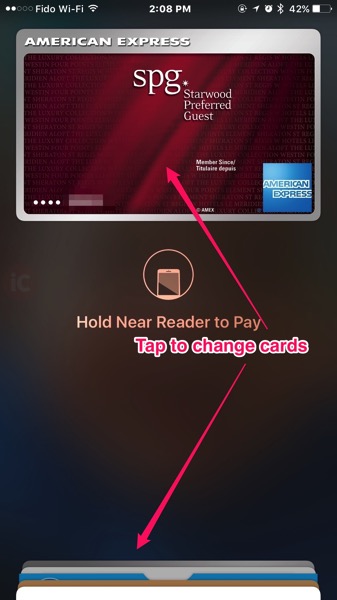
3. To change cards before paying, double-click the Home button from the lockscreen to bring up Apple Pay (can be toggled off in Wallet & Apple Pay settings). Either tap your existing card, or tap the stacked cards at the bottom to bring them up, then select the card you want to use.
PSA: Let it be known, the Apple Pay ‘right of passage’ is having it fail on you, or not work despite showing “completed” on the terminal. This will always occur when you have a massive line up behind you (morning coffee line ups are common). Sweating and feeling anxious may occur, when your so-called Apple gadget doesn’t work, and you look like a sketchy weirdo trying to tap your wrist repeatedly to the terminal, mumbling “it should work this time, I’m sure.” (and it doesn’t).
Check out the video demo below:

How do I pay with Apple Pay using my Apple Watch
1. Double tap the side button—then hold your Apple Watch near the credit card terminal. Need to switch cards? Just slide left until you see the one you want to use.
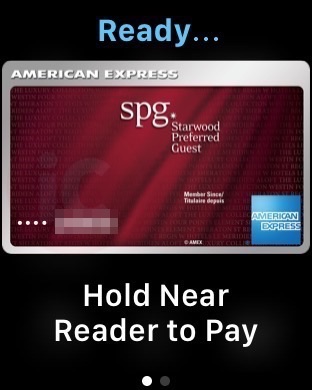
Your default card can be changed by going to My Watch > Wallet & Apple Pay and selecting your Default Card.
You can also use Apple Watch on its own without having your iPhone with you for Apple Pay. This is handy if you’re out on a jog and have your Apple Watch—you can pop into any supported store to make purchases!
Check out the video demo below:

How do I Pay with Apple Pay on my iPad?
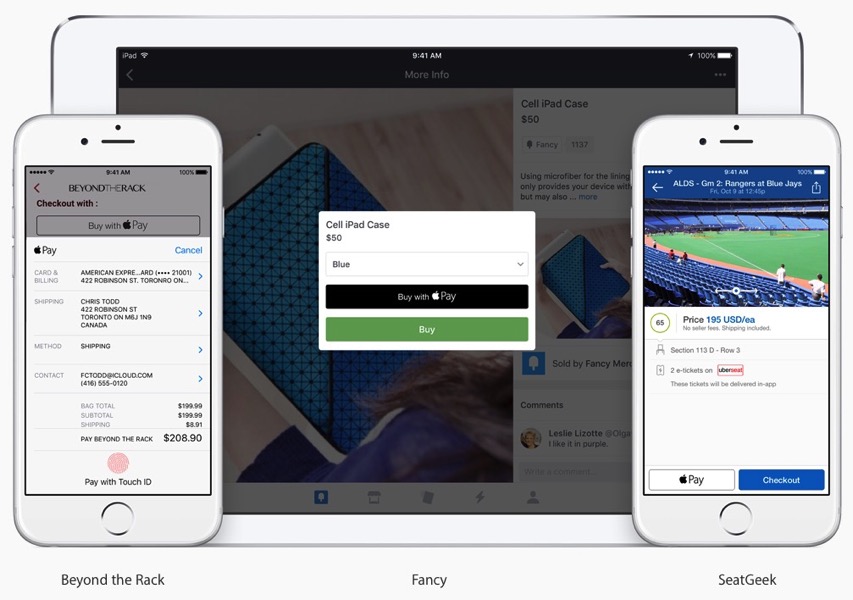
When it comes time to use Apple Pay for in-app purchases, just authorize your payment with Touch ID.
Apple says “soon, you’ll be able to use MasterCard and Visa cards from CIBC, ATB, Canadian Tire, and Royal Bank of Canada (RBC) with Apple Pay within apps.”
Update: ATB Financial and Canadian Tire have now launched support for in-app payments with Apple Pay
What stores can I use Apple Pay at in Canada?
Any store that accepts contactless payments for your supported credit card. Apple’s list of featured stores include the following:
Others include Shopper’s Drug Mart, Shell, Starbucks, Co-Op, Longo’s, Husky, Rexall, Jean Coutu, Municipal Parking, Ardene, Canada Computers, Save on Foods, TTC PRESTO stations and pretty much any other store you know of that supports tap.
How Do I Return an Item with Apple Pay?
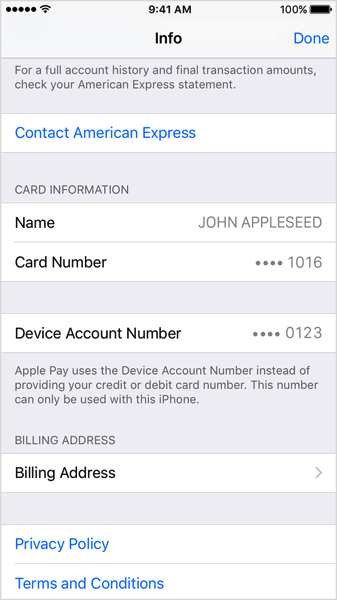
Retailers will use the Device Account Number on your iPhone or Apple Watch to process your return. To get your refund, just hold your device to the terminal like you’re paying when prompted.
My iPhone, iPad or Apple Watch is Lost or Stolen, Am I Hooped?
Nope. Without Touch ID or your Apple Watch passcode, Apple Pay cannot be accessed. You can go to iCloud.com to also remove Apple Pay capabilities from devices.
How Secure is Apple Pay?
According to Apple:
Apple Pay is safer than using a traditional credit or debit card. Every transaction on your iPhone or iPad requires you to authenticate with Touch ID or your passcode. Your Apple Watch is protected by the passcode that only you know, and your passcode is required every time you put on your Apple Watch. Your card number and identity aren’t shared with the merchant, and your actual card numbers aren’t stored on your device or on Apple servers.
When you pay in stores, neither Apple nor your device sends your actual credit or debit card numbers to merchants. When you pay in apps, the merchant will only receive information like name, email address, billing and shipping addresses you authorize to share to fulfill your order. Apple Pay retains anonymous transaction information such as approximate purchase amount. This information can’t be tied back to you and never includes what you’re buying. Apps that use Apple Pay must have a privacy policy that you can view which governs the use of your data.
Not only is Apple Pay secure, but it’s also private too.
Become an Apple Pay expert—try these 6 simple steps to ensure the fastest checkout every single time.
What did we miss? Let us know how your Apple Pay experience has been so far–and don’t forget to share this FAQ with your friends and family.
Last updated June 1, 2016
Want to see more of our stories on Google?

P.S. Want to keep this site truly independent? Support us by buying us a beer, treating us to a coffee, or shopping through Amazon here. Links in this post are affiliate links, so we earn a tiny commission at no charge to you. Thanks for supporting independent Canadian media!


I tried it at an Ultramar gas pump and the pump went crazy and crash the POS. I had to go to another pump and use my card. I guess that they are not compatible yet
My Costco MasterCard always seems to crash Petro Canada gas pumps when I tap it. So it might not be specifically an Apple Pay issue.
I tried it today at new Pioneer Gas station in Oak Ridges, didn’t work with RBC Visa Apple pay, but worked with the same plastic.
I know scotiabank hasn’t launched yet but does anyone know how this scenario would work: the Scotiabank Gold Amex doesn’t have tap to pay – can it still be used with Apple Pay? can it be used with all tap-to-pay terminals or only those that allow Amex specifically?
As of a week or so ago, the Gold Amex does indeed have tap. Just call in like I did and get a new card with the tap 🙂
Woo just called and got it sorted, thanks a lot ! 😀
Is there a limit set on the transaction amount, like tap has now?
Sorry, never mind. Missed that part above. :-/
What is the oldest IOS needed for this to work? 8.0? 9.0? 9.3?
RBC cards on Apple Watch don’t work. I set them up the same way of my Amex on my Apple Watch but transaction was not supported and immediately I changed to Amex on my watch and it worked.
My WestJet RBC MasterCard works, both on iPhone and AppleWatch. No problems.
Hmm, odd, I was able to use my RBC debit card on my watch and it worked.
Pro-tip if paying with your phone you only need to hold it to the terminal to light it up. No need to double tap the home button first. If you want to switch cards just do so prior to touching the touch-ID sensor 🙂
Yup, we noted that part about not needing to do anything to activate Apple Pay. It’s so bloody seamless
I need to get used to that part as I have activated the phone myself and not let ApplePay to that on its own
Yeah, it can be a bit weird at first thinking you need to turn the screen on…but you don’t. It’s still so cool
Looks like as lot of people such as myself are getting the card not supported message when adding RBC visa. Have RBC mobile wallet but not able to add my card.
Wonder what’s causing this
So I tried using it at timmies today…I was under the impression that as long as my phone is near the reader..it should work but it didn’t until I physically tap my phone to the machine as if I am to tap my card to the reader. My question to the pros..am I suppose to tap my phone to the reader with my thumb on the home button or have my phone near the reader/terminal?
Keep thumb on Touch ID, move phone to reader (the display area is usually the target). Apple Pay will automatically turn on your screen and authenticate.
I also find it can be helpful to wait until the reader shows “TAP”, then move my iPhone to the terminal, and not before.
ahh…I didn’t wait for the tap message and went straight to the terminal. Guess I will try again tomorrow at shoppers also Gary my phone’s screen didn’t turn on, I had to unlock it then go to wallet or double click home button to use Apple Pay..anyhow thanks for the tips!
Good luck. Try moving the phone closer, like right about the terminal display, almost touching. That should do it. I have always had good luck at Shopper’s Drug Mart, even with my Apple Watch.
Hey Gary, is there a reason why I wouldn’t get a checkmark with ApplePay even though the payment was successful, also how come on card notifications sometimes it gives you all the information about the store from Yelp, other times it just gives you the transaction amount. It happens with the same store like la prep sometimes I get the extra information other times only the amount
Hmm, that is weird. Are you seeing the transaction on your credit card?
Yes I do. There is something I can ask on about location services on your iPhone, I’m seeing 2 different wallet apps on mine, one has the checkmark while using the app the other one is empty. I’m not sure of this starting happening after I started using ApplePay or before
I used it today at Wendy’s with my RBC Visa. The first time I tried the machine froze lol then they canceled and I tried again and it worked 🙂
Nice!
I have used both my RBC visa(Avion infinite) and RBc debit card through Apple Pay about 8 times since Tuesday. I only tried it larger chain stores( Loblaws, Esso, Shoppers). It has worked every time but as in the other posts I find you have to be very close or touching the terminal but that was the case for tap previously anyway. I have noticed that sometimes there is a slight delay when I am already holding my finger on the home button. It’s almsot like it prefers the conscious act of touching the the fingerprint after you have reached the terminal but that is just my anecdotal observation at this point.
I used RBC Visa in The Beer Store and Ultramar – worked perfectly, with no hiccups.
At ultramar, did you pay at the pump?
No, I paid inside and the cashier wasn’t surprised at all.
Ok, but i had problems at the pump, it crashed the POS. inside it was ok
I guess that an update have been pushed because now it’s working. Same place different week!
I used my CIBC PetroPoints MasterCard at Superstore with no problem.
N00b question lol:
If I reboot my phone and then try to use Apple Pay, is it going to work or is it going to prompt for my iCloud password first?
You will require your passcode after reboots…so once you unlock your device it should work fine.
used apple pay at a toronto pot dispensory and it worked lol
I see you’re weeding out stores that will accept Apple Pay
indeed
also
reefer induced optimum points 😀
We have the $100 tappable limit here in Canada. Same in the USA? Will Canada change this? I hope so.
I am running into a new problem. The cashiers have not head a thing about Apple Pay and they argue with you and tell you it won’t work, and of course it does.
As noted in the FAQ, never mention Apple Pay to a cashier at this point in time. They get so puzzled and are adamant it won’t work. My first time trying Apple Pay at my local Shopper’s, the cashier was so confident it would not work. The moment it went through, she was blown away.
Just say you are paying with Visa/MC/Amex and pretend to reach for your wallet 🙂
This is such a common thing… and it’s painful. No corporations seem to be informing their employees of this new method of payment. My friend used Apple Pay at Starbuck the other day and the cashier was amazed… even though Starbucks has been a featured supporter since November!
But… that’s just the way of things. I remember when Interac Flash first came out back in 2013 and I used it at a DQ. The cashier didn’t even know their terminals could do tap. In time, as Apple Pay (and Android Pay) will become common and better known.
Like Gary said, the best protocol is to not say “Apple Pay” when a cashier asks you how you’re paying.
One feature that is desperately needed.
If your Amex tap fails, to automatically cycle to the next card so you look less like a fool, since amex tap isnt everywhere.
I’ve used it in Canada a couple times with no issue. Am in the USA now and it wouldn’t work at Panera Bread. Are Canadian banks not supporting cross border purchases, or just a fluke?
Hmm that is weird, it should work. Have you tried other merchants? Starbucks?
Were you trying it with your debit or credit Apple Pay?
Tried both. The Starbucks we were at this morning didn’t take Apple Pay, so haven’t had a chance to try again yet.
Yeah, I was told by my bank, I wouldn’t be able to use my Visa Debit card in the US with Apple Pay, I would have to use my physical card to use my Canadian issued Visa Debit card. But Canadian issued credit cards with Apple Pay should work in the States at certain merchants.
Confirmed it also works at Pizza Pizza in Toronto.
I decided to lend my voice and emailed PC Financial at their customer care address. I got this reply:
Thank you for your e-mail, President’s Choice Financial is committed to bringing our customers the best payment experience possible. While Apple Pay is not currently available to PC Financial Customers, we continue to actively explore a number of mobile payment solutions. We appreciate your patience. Stay tuned for more details.
Thank you,
Cole
That replay exactly shows how they “actively explore” ????
Funny question: Will I need to update my phone to the latest iOS version in order to use Apple Pay? I am currently having a SCENE Scotiabank Debit Card so I can’t try it for myself. Also, it would be great if I can still keep my jailbreak and do business with Apple Pay when Scotiabank implements it
Yes
yep. Time to make the big leap from 9.0.2 to 9.3.1. It’s been a fun experience with jailbreaking, but good things sometimes have to stop for better things I guess. Thanks Gary for the quick reply
Apple Pay is so convenient, I think it’s worth it, good luck!
So since all the TTC is going presto, their is talk that next year it will all go tap, so while presto gives you discounts any card, or phone will work on the TTC
It works well in stores, now I’m looking forward to using it within apps.
@gary_ng will you let us know when Apple Pay is supported within apps?
—
from above:”Apple says “soon, you’ll be able to use MasterCard and Visa cards from CIBC, ATB, Canadian Tire, and Royal Bank of Canada (RBC) with Apple Pay within apps.”
I tried setting it up in the Starbucks app but it says Apple Pay = ‘disabled’
Yes we will update when it arrives. Guessing once TD, Scotia, BMO come on board, in-app purchases with Apple Pay will launch
At McDonald`s restaurants that have the new self-order kiosks, I use the McDonald`s app to present the digital coupon code to the kiosk’s optical reader and use Apple Pay to make the payments. At Shoppers Drug Mart I also use Apple Pay and scan my Optimum card from their app.
I’m in the process of applying for the Amex Gold card which gives 2 points for purchases at gas/grocery/restaurants, and noticed this in the fine print:
“Earn rate of 1 point for every $1 applies if the merchant code is not in an eligible category, the purchase is made using an electronic wallet or is not made directly from the provider of the good or service, e.g. through a third party or by using a mobile device (e.g. smart phone) with an attached card reader.”
Does this mean using Apple Pay will only give me 1 point even for the eligible categories?
I think those terms and conditions describe a merchant like a food truck that accepts Amex through paypal or stripe rather than through a standard merchant account.
My Amex gives the advertised 2/$1 even using Applepay so I don’t think that sentence applies
Great to hear, thanks for the reply
Will Apple Pay ever support Cash-back debit transactions? I tried at Sobey’s and it didn’t work, since for cash-back you typically need to insert/swipe a physical card. But if Apple Pay is supposedly more secure, would they ever allow debit cash-back? That would be interesting…
It doesn’t work in the US either. You can’t do cash back on Apple Pay because (in the US at least) they are considered cash advances on credit rather than PIN-required Debit. Given the US system of chip+sign is no better than the Magstripe that preceded it.
In Canada the Debit card system uses Interac, so if it ever gets support, it would only ever be supported by Interac logo cards and not ones that work as “Visa Debit”
Fun fact… The Scotiabank Amex card used to give one of those two generic errors but now bypasses to Amex terms and conditions before Amex says the card isn’t currently eligible for Applepay.
Scotia T&C appear after inputting the Scotia Amex creds, but eventually says “Card not added, contact card issuer for more information”
Doesn’t work with my other Scotia visa or debit cards. Says either not eligible or not supported.
Scotia app update just released saying “Apple Pay coming soon, please update your app”!
Wasn’t TD the first one to leak Apple Pay last year? And now they are the last of the 5 major banks who still haven’t updated their app and support Touch ID!
Ironic isn’t it!
Yup! Switched to TD thinking they would be first…but, nope…
It appears that if you exclusively use ApplePay (and tap) and rarely use chip and pin entry, then your card may be temporarily blocked/denied. I found this out at a restaurant – I tried to do the ApplePay and was immediately declined, even though the terminal nomrally accepts tap. Even a card tap was then declined.
The explanation given was that I had done too many tap to pay tranaactions in a row, and it was thought to be possibly a lost card. Apparently they can’t see that its ApplePay which is more secure than just a tap.
Just FYI that happens even with the physical card.
From experience, roughly every 20 NFC payments, with the physical card or Apple Pay, you will get a decline and a request to insert the card. Sometimes the POS isn’t helpful and will request inserting the card, when really it was the card type (AMEX) that is causing the denial not the NFC payment. I have yet to find a place that previously accepted NFC not take Apple Pay. I have found a few places that didn’t take AMEX before that still don’t take AMEX, but if you have the AMEX set as default and it tries to process it, it will instead ask you to insert the card instead of going “not supported”. In the case of the physcial cards, using the chip+pin just resets the once on the chip/nfc on the card. While Apple Pay this isn’t necessary, but as far as the banking system is concerned it’s still a “NFC card” and has to play by the NFC card rules about occasionally asking for the physical card to be inserted.
Any plans to update the article?